Diff Viewer UI / CLI
Difflicious CLI provides both interactive and non-interactive viewing of diffs generated by the tests failures.
You can interactively explore diffs from test failures by launching in TUI (Terminal user interface) mode. For non-interactive use cases such as for LLM AIs, you can view the diffs in plain (human readable) or JSON format.
If you are using Difflicious' sbt-difflicious plugin,
running diffliciousViewer command will launch the TUI / CLI.
About test diff reports
With the SBT plugin loaded and configured for your test framework, each failing diff test will generate a test report as a JSONL file.
runId: Whenever you run test, testOnly etc in SBT, a new test runId will be generated and passed to the test framework.
The runId is a ULID value that uniquely identifies each test run and has a timestamp embedded in it.
testId: Each test failure will generate a unique testId. You can use testId to jump straight to the diff result for that failed test.
Interactive TUI
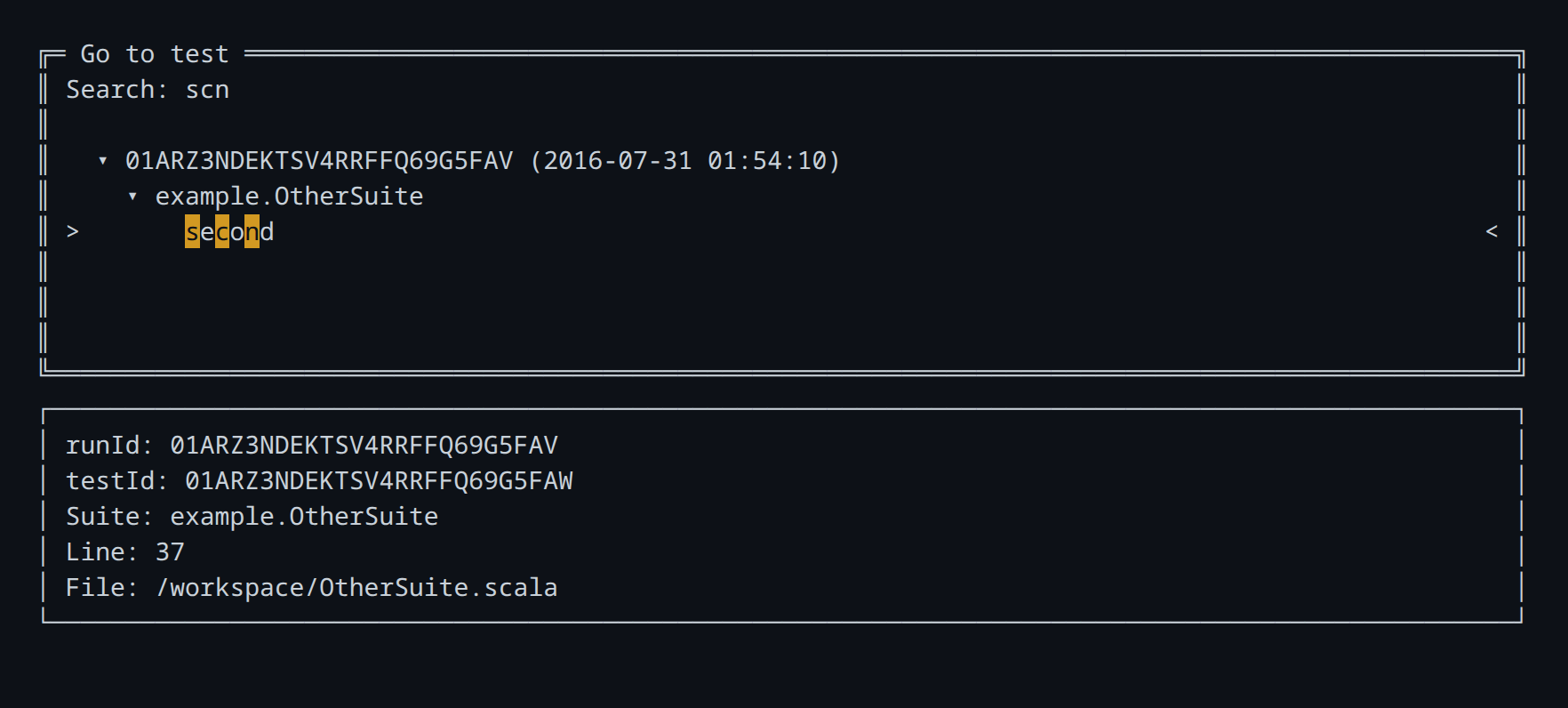
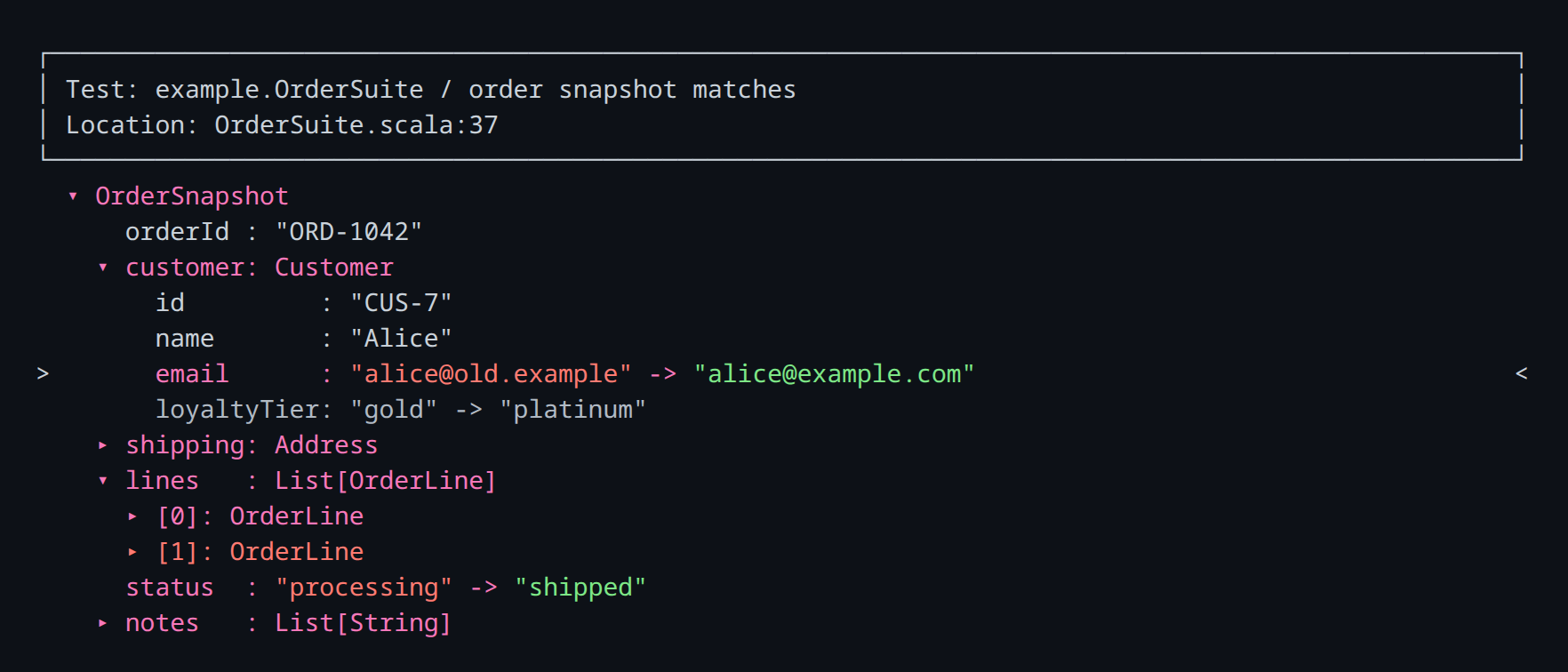
By default, the CLI launches in TUI (Terminal User Interface) mode. You can search for tests and interactively explore the differences.
Only failures from the latest detected test run are shown. Pass --all-runs to include failures from older runs.
sbt> diffliciousViewer
Search for and select a test failure:
Explore the selected diff:
Hotkeys
Here are some TUI hotkeys. In general, vim-style keybindings are provided too.
| Hotkey | Action |
|---|---|
| ↑ / k, ↓ / j | Move the selection up or down |
| Enter / o | Open or toggle the selected entry |
| ← / h, → / l | Collapse or expand the selected field |
| f / b | Jump to the next or previous difference |
| / | Search field names and values in the current diff |
| F6 | Toggle search between fields and values, values only, and fields only |
| n / N | Jump to the next or previous search result |
| F4 | Clear field search highlighting |
| a | Anchor the selected subtree as the root. Useful if you want to "zoom in" on a particular part of the diff) |
| t | Reset anchoring and return to showing the root of the diff |
| ? / F1 | Show the complete hotkey reference |
| Esc | Go back or confirm quit |
| Ctrl+C / Ctrl+D | Quit immediately |
Non-interactive mode
Non-interactive mode is useful for quickly viewing a diff.
There are two modes:
- Plain (
--plain): Plain text format useful for both humans and AI agents - JSON (
--json): If you need programmatic rendering of the diff details
Plain text output (--plain)
To print failures from the latest detected test run as plain text:
sbt> diffliciousViewer --plain
To include failures from every detected test run, pass --all-runs:
sbt> diffliciousViewer --plain --all-runs
To print only the failure with a specific test id:
sbt> diffliciousViewer --plain --test-id 01ARZ3NDEKTSV4RRFFQ69G5FAW
The plain output includes test metadata, a summary, and each difference. For example:
Difflicious diff report: different
Summary: 1 diff failure(s), 6 non-ignored change(s).

Failure 1: example.OrderSuite / order snapshot matches
Run id: 01ARZ3NDEKTSV4RRFFQ69G5FAV
Test id: 01ARZ3NDEKTSV4RRFFQ69G5FAW
Location: /workspace/OrderSuite.scala:37
Difflicious diff result: different
Summary: 6 non-ignored change(s), 1 ignored subtree(s).

Differences:
1. $.customer.email - changed
   obtained: "alice@old.example"
   expected: "alice@example.com"

2. $.customer.loyaltyTier - ignored

3. $.shipping.city - changed
   obtained: "London"
   expected: "Bristol"

4. $.lines[0].quantity - changed
   obtained: 1
   expected: 2

5. $.lines[1] - obtained_only (OrderLine)
   obtained:
      OrderLine(
        sku: "SKU-OLD",
        description: "Discontinued lid",
        quantity: 1,
        unitCents: 499
      )

6. $.status - changed
   obtained: "processing"
   expected: "shipped"

7. $.notes[0] - expected_only
   expected: "Leave with reception"